







Meals-on-Wheels Round Up Donations
We integrate with the Meals on Wheels Round-Up Donations program so your customers have the option t
 January 26, 2026
This guide will walk you through the onboarding process for IT Retail Payments. It includes step-by-step instructions, required documents, troubleshooting guidance for common errors, and explanations for various business types.
You will receive a welcome email containing a link to the online application that you'll need to complete.
You will need to have the following on hand for reference and/or submission as you fill out your application:
Accepted Formats — JPG, JPEG, PNG, and PDF
File Size — No larger than 4MB
Images — Must be clear, full-color, properly cropped, and not combined into one file.
ID Cards — Must be uploaded as separate files (front and back).
You can find the status of your application at the top of the payment portal once you've successfully submitted the application. Once submitted, if there are additional validations that are needed you will be notified by email. You can also find additional validation requirements on your Profile page.
Validation usually only takes a few minutes, but it can take up to 24 business hours from the time the account was submitted if additional validation is required.
Below are the possible Status Flags you will see in the payment portal for you account:
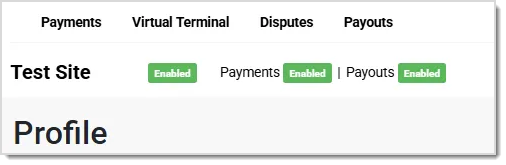
💡Note: If you are not sure why a particular status is on your account, please contact the onboarding team member that is assisting you with your account.
To order new terminals or ethernet docks, please contact your Onboarding representative, or reach out to our Support team using the phone number at the bottom of this article.
If your onboarding application fails or documents are rejected, the portal will display specific error codes. Refer to the complete Onboarding Error List article linked below with recommended actions and required documents. Always verify that all entered details match uploaded documents exactly, including punctuation, case, and numerical formats.
Q: I have a question, but I can't find my answer here. How do I get more assistance?
A: If you need immediate assistance, the IT Retail team is available 24/7. Feel free to contact our support team at: 877-752-0625. You can also email us at support@marktpos.com and we will respond within 24-hours.
Is this page helpful?
×Help us improve our articles