







Setting Up Receipt Texting
The IT Retail system lets you send customers copies of their receipts via text message, which saves
 January 21, 2026
Your cashiers may occasionally encounter problems with the Front End's connection to the Back End. When this happens, new products added from the Back End along with any other changes made there will not sync with the Front End. Learn how to troubleshoot this issue.
When a cashier is logged in from the Front End, they should see the BE (Back End) in the upper left highlighted as pictured below.
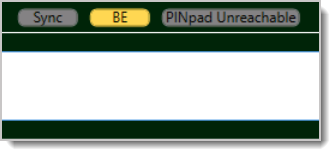
If the Front End is not showing the BE indicator, this means the Front End register is not synced with the Back End. Any new products, customers, and settings made in the Back End will not load in the register. Likewise, any new customer record made from the Front End will not load in the Back End. However, any transactions will be stored in the register until it's connected with the Back End again.
Sometimes, this connection gets disrupted due to IT Retail making planned updates to the Back End. If that's the case, we recommend waiting until the updates are finished, since the connection should reestablish after that.
Other troubleshooting methods we recommend are:
Sign out of the Front End and sign back in.
Restart your register computer and sign into the Front End again.
If these do not reestablish the Front End to Back End connection, contact the IT Retail Support Team for help. Call the team at 877-752-0625, or email support@marktpos.com.
Basic Hardware Troubleshooting
Card Terminal Network Settings and Requirements
Q: I have a question, but I can't find my answer here. How do I get more assistance?
A: If you need immediate assistance, the IT Retail team is available 24/7. Feel free to contact our support team at 877-752-0625. You can also email us at support@marktpos.com, and we will respond within 24 hours.
Is this page helpful?
×Help us improve our articles