







Setting Up Receipt Texting
The IT Retail system lets you send customers copies of their receipts via text message, which saves
 January 20, 2026
Variable weight barcode labels are for items that are priced by weight. For example, for meat and poultry items you typically weigh and price them, then print and place barcode labels on their packaging. The cashier will use a scanner to read the barcode and add them to the transaction. Keep reading to learn the ins and outs of variable weight labels!
Please Note: If you use scales other than the CAS 5500 series, you should contact the company that makes your deli scales to ensure the scales follow the correct format for IT Retail according to the information below.
Please Note: For this part, you should first check your POS Manager settings. In the Back End, go to Administration > POS Manager > Keep check digits.
If your POS Manager settings have Keep check digits set to Yes, items with variable weight labels will need UPCs that begin with 002. If it’s checked as No, it will instead be 02. This is how IT Retail will read variable weight items. For a barcode format, you'll use digits in this order, but without the brackets:
[Flag] [Product Code] [Price] [Check Digit]
We'll explain below what each component should look like.
| Flag | Product Code | Price | Check Digit |
| Will be just a 2 | Made up of 5 digits | The item's price; made up of 5 digits | Single digit |
Here's an example of a correctly formatted label.
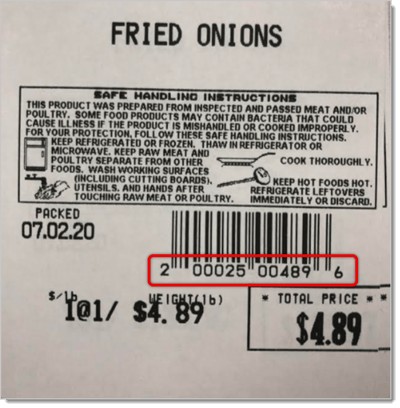
Here's the breakdown of this label.
| Flag | Product Code | Price | Check Digit |
| 2 | 00025 | 00489 | 6 |
In order to add this particular product to the Back End, start the UPC with 002, then add the Product Code. Leave the Price component as just zeroes. Do not include the check digit; leave that also as just 0.
This is what the UPC should look like for this example: 0020002500000
On the other hand, this is an example of an incorrect label.
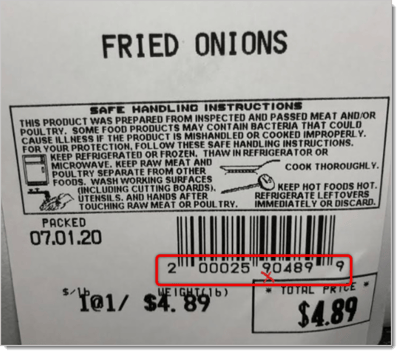
| Flag | Product Code | Price | Check Digit |
| 2 | 000259 | 0489 | 9 |
In this case, note that the Product Code is made up of 6 digits, and the Price is made of 4 digits.
Here's another example of a correct label, this time for an item that has a price fully made of 5 digits.
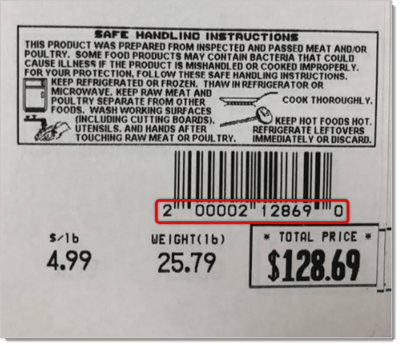
The barcode breakdown:
| Flag | Product Code | Price | Check Digit |
| 2 | 00002 | 12869 | 0 |
This is what the UPC for this example should look like in the Back End: 0020000200000
Like with the other correct example, start the UPC with 002, then add the Product Code. Leave the Price component as just zeroes. Do not include the check digit; leave that also as just 0.
Q: I have a question, but I can't find my answer here. How do I get more assistance?
A: If you need immediate assistance, the IT Retail team is available 24/7. Feel free to contact our support team at 877-752-0625. You can also email us at support@marktpos.com, and we will respond within 24 hours.
Is this page helpful?
×Help us improve our articles