







Cashier Training
Welcome to IT Retail, we’re so glad you’ve chosen our POS for your store! This article will guide yo
 November 20, 2025
Your Till Status Report will give you details of the Front End’s status and how much cash should be in the drawer. Read on to find out how you can work with this report.
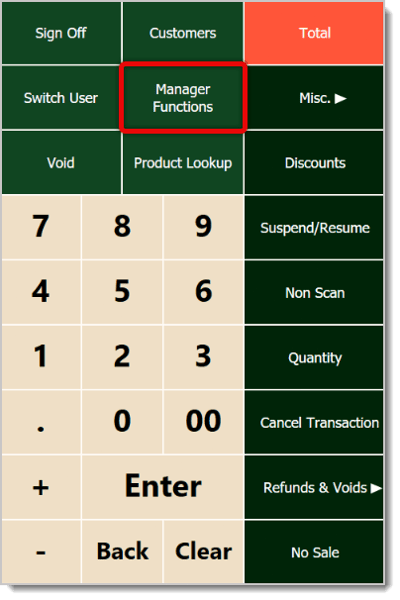
Click or tap on Manager Functions on the far right.
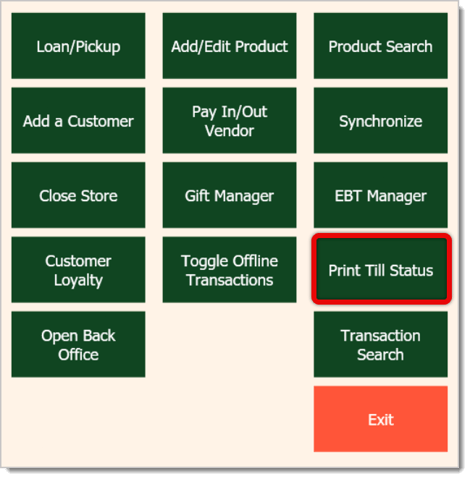
In the Manager Functions window, click or tap on Print Till Status.
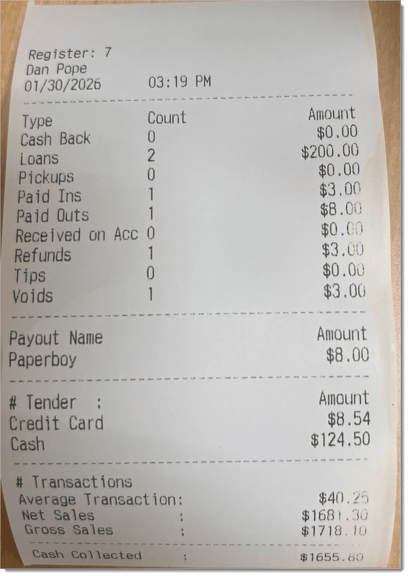
You’ll get a printout showing the Register Number, Cashier Name, Date, and Time of the Printing at the top. Below that, you’ll see a summary of Front End activities.
The main area will show the Type of Activity (Cash Back, Loans, Pickups, Paid Ins, Paid Outs, Received on Account, Refunds, Tips, and Voids), Count of each activity, and the total dollar Amount of each.
Underneath that, the printout will show the Names of Paid Outs from this register, and the Amount that was paid out for each.
Then the printout will show what Tenders were used for transactions on this register and the total Amount paid with each Tender.
You’ll also see dollar amounts for the Average Transaction, Net Sales, and Gross Sales.
The bottom of the printout will display the total amount of Cash Collected for this register.
Manager Functions in the Front End
Q: I have a question, but I can't find my answer here. How do I get more assistance?
A: If you need immediate assistance, the IT Retail team is available 24/7. Feel free to contact our support team at 877-752-0625. You can also email us at support@marktpos.com, and we will respond within 24 hours.
Is this page helpful?
×Help us improve our articles