Gift Card Setup

November 12, 2026
In the IT Retail Front End you are able to use the Gift Manager to activate new Gift Cards, see balances, and reload Gift Cards for use in the Point of Sale. This article will show you how to use all tools in the Gift Manager. Take a look!
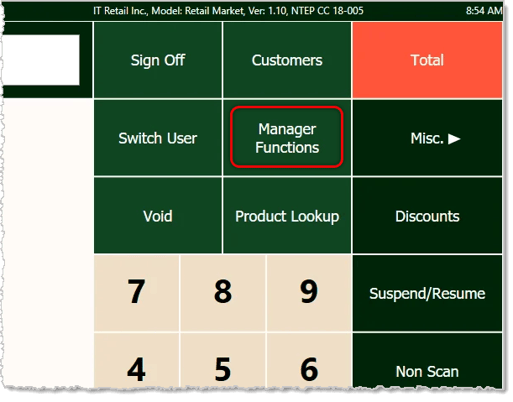
To get to this part of the system, log into the Front End and click on Manager Functions. You'll see the Gift Manager in the Manager Functions buttons.
Gift Manager
Click or tap the Gift Manager button in the Manager Functions window to work with Gift Cards in the Front End. Here are the functions you can use:
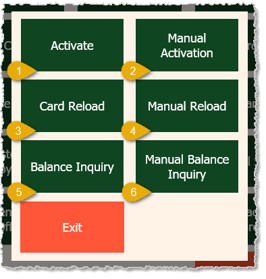
- Activate — If you have gift cards that will work with your integrated card reader, you can click or tap this button. The terminal will prompt you to tap, swipe, or insert the card being activated (depending on the card and terminal capabilities your activation methods may vary) and then enter the amount being loaded onto the card.
- Manual Activation — If you have gift cards that are not integrated with the system, you can click or tap this button. You'll be prompted to enter the amount and then the card number. If your gift cards have barcodes printed on them, you can scan in the barcode. The new gift card will be registered in the system at the completion of this process.
- Card Reload — If you are using an integrated card terminal that will work with your gift cards, you can click or tap this button and that terminal will prompt you to enter the card and amount you are loading into it. The terminal will offer some preset amounts ($10, $20, and $50) as well as a Custom amount.
- Manual Reload — If you are not using an integrated card terminal that works with your gift cards, click or tap this button and you'll be prompted to enter the amount you're loading onto the card. Then either scan in the card number via barcode scanner or manually enter the number to reload the card.
- Balance Inquiry — If you are working with an integrated card terminal that can work with your gift cards, when you click or tap this button the terminal will prompt the customer to tap, insert, or swipe their card. It will then display the remaining card balance for them and for you.
- Manual Balance Inquiry — Click or tap this button if you are not using an integrated terminal for your gift cards. A window will pop up that will allow you to scan a gift card barcode or manually enter its number. The system will show you the remaining balance on the card.
Related Topics
Gift Card Sales
Cashier Training
Tender Types in the Front End
Manager Functions in the Front End
Frequently Asked Questions
Q: Can Gift Cards with credit card brand names on them, e.g. Visa and Mastercard, be used for payment in the IT Retail system?
A: Yes. Gift Cards with major credit card brand names can almost always be used as regular Credit Cards, but should not be used as the Gift Card payment type. In the IT Retail system, the Gift Card payment type is for cards encoded by the system and loaded with funds through the Front End.
Q: I have a question, but I can't find my answer here. How do I get more assistance?
A: If you need immediate assistance, the IT Retail team is available 24/7. Feel free to contact our support team at: 877-752-0625. Or you can email us at support@marktpos.com and we will respond within 24-hours.
Welcome to IT Retail, we’re so glad you’ve chosen our POS for your store! This article will guide yo
Adding products to a customer’s transaction is straightforward. Below is a step-by-step guide on how
You can ring up a product as a Non-Scan item if it doesn’t have a UPC / PLU code or it's not yet reg









Is this page helpful?
×Help us improve our articles