Gift Card Sales

December 18, 2025
If you need to see the financial details of the Gift Cards you've sold, the Gift Card Sales Report is where to look. This article shows you how to work with your Gift Card Sales Report. It's simple, take a look!
Generate Your Gift Card Sales Report
From the Back End, open the Gift Cards menu and click on Gift Card Sales.
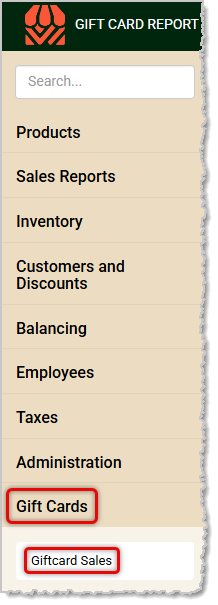
Please note that this report doesn't need a date range because is has data from all of your Gift Card sales in most columns. Here is how to work with your Gift Card Sales Report:

- Data Table — The Data Table for the Gift Card Sales Report shows the following:
- The number of Gift Cards Loaded today.
- The total Dollar Amount Loaded for all cards ever activated in the Front End.
- The number of Gift Cards Redeemed (cards that have been used, even for partial amounts) since the system was initially activated.
- The total Dollar Amount Redeemed for all cards ever activated in the Front End.
- The total dollar amount of Liability for all outstanding Gift Cards. This amount is the Dollar Amount Loaded minus the Dollar Amount Redeemed, and it represents the remaining balances that can be used on all active cards.
- Action Menu — Click this 'Three-Dot Stack' button to open the Action Menu for the table. This area offers you export options and lets you choose data column visibility. Here are your options:
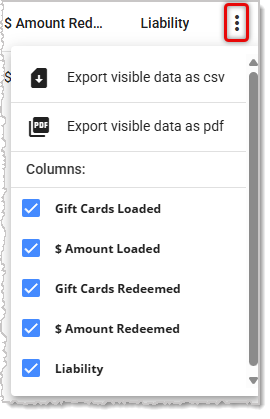
- Export Visible Data as a CSV — This will include only the data for the active columns selected below.
- Export Visible Data as a PDF — This will create a PDF file using only the data for the active columns listed below.
- Columns — By default, all columns will be active (checkmarked), but you can also un-check any columns you don't need to see.
We recommend that you keep monthly or quarterly exports of this report for your records if you actively use Gift Cards.
Please Note: The End of Day Report has a section about Gift Cards that displays data for whatever date range is selected.
Related Articles
Gift Card Setup
Tender Types in the Front End
Payment Methods
The End of Day Report
Frequently Asked Questions
Q: I have a question, but I can't find my answer here. How do I get more assistance?
A: If you need immediate assistance, the IT Retail team is available 24/7. Feel free to contact our support team at 877-752-0625. You can also email us at support@marktpos.com, and we will respond within 24 hours.
The first thing you'll see when you open the IT Retail Back End is the Dashboard. Here, you can see
Keep track of your store's overall sales by working with your Store Sales report in the Back End. Th
The Product Sales report from the IT Retail system's Back End breaks down your store's product sales








Is this page helpful?
×Help us improve our articles