Quick Add

December 05, 2025
You can use Quick Add to easily add a product in the Back End of the IT Retail system. This page only has a few required fields, so you can easily add a new product for the Front End. Here’s how to use it!
How to Use Quick Add
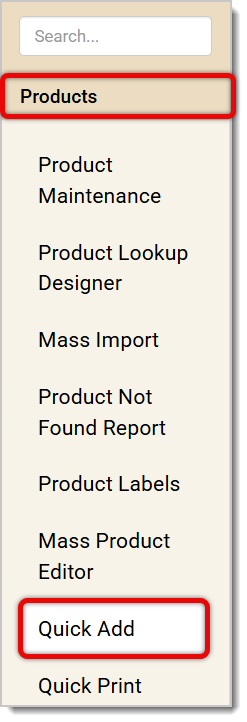
Go to Products > Quick Add.
Your screen will look something like the image below. Here’s how to use each function:
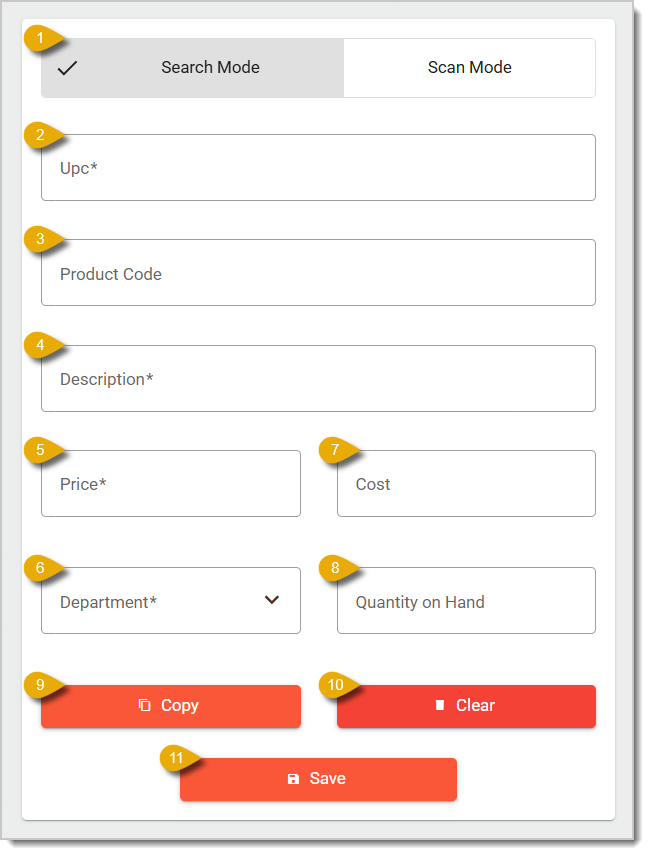
- Search Mode / Scan Mode — Click on either tab to switch between modes. A checkmark will show which mode is active. Entering an item in Search Mode will make it available when someone uses Product Lookup in the Front End. Scan Mode will enter the product in the normal way, and all items saved in the system can be scanned into transactions.
- UPC* — Enter the UPC number of the product.
- Product Code — Enter your store’s Product Code for this item. Product Codes are alternatives to UPCs and allow for both letters and numbers.
- Description* — Enter the description of the product, such as “Cache Farms Chocolate Almond Milk, 32 oz.”
- Price* — Enter the price of the item.
- Cost — Enter how much your store pays for the item per unit.
- Department* — Select the Department for the item from the drop-list.
- Quantity On Hand — To keep track of your inventory, add how many units you have of this item.
- Copy — Click on this button to make a copy of the item and its details. You can use this if you need to change the UPC of an item. Since you’re unable to change the UPC once an item has been saved, you can make a copy to edit the UPC, and then you can delete the old product entry.
- Clear — Click here to remove the information from all fields if you need to start fresh.
- Save — Once you’re finished with the form, click the Save button to save the product.
* Required Field
Related Articles
Product Maintenance
Departments
Mass Product Editor
Frequently Asked Questions
Q: I have a question, but I can't find my answer here. How do I get more assistance?
A: If you need immediate assistance, the IT Retail team is available 24/7. Feel free to contact our support team at 877-752-0625. You can also email us at support@marktpos.com, and we will respond within 24 hours.
Adding products to a customer’s transaction is straightforward. Below is a step-by-step guide on how
Processing refunds and returns is a natural part of retail sales. We’ll walk you through the steps o
Going live with EBT (SNAP) is exciting and may not be as daunting as you’d think. We've done a few t








Is this page helpful?
×Help us improve our articles