Setup and Use of EBT

December 03, 2025
Going live with EBT (SNAP) is exciting and may not be as daunting as you’d think. We've done a few things to make your life easier, and we will cover them in this article. Take a look!
Setting Up Your System to Take EBT Payments
You can find more information about EBT here. To start this process, do the following:
- Reach Out to Your Processor or Rep — If you did not opt to take EBT payments when setting up your payment processing account you can make the adjustment after the fact by reaching out to your processing company or representative. It typically takes a few days for EBT to go live on an account.
- Flag Items as Eligible for Food Stamps - Hopefully your store inventory is organized by department. If so, open the Back End click to open the Administration menu, then click on Departments. Once the page loads, follow these steps:
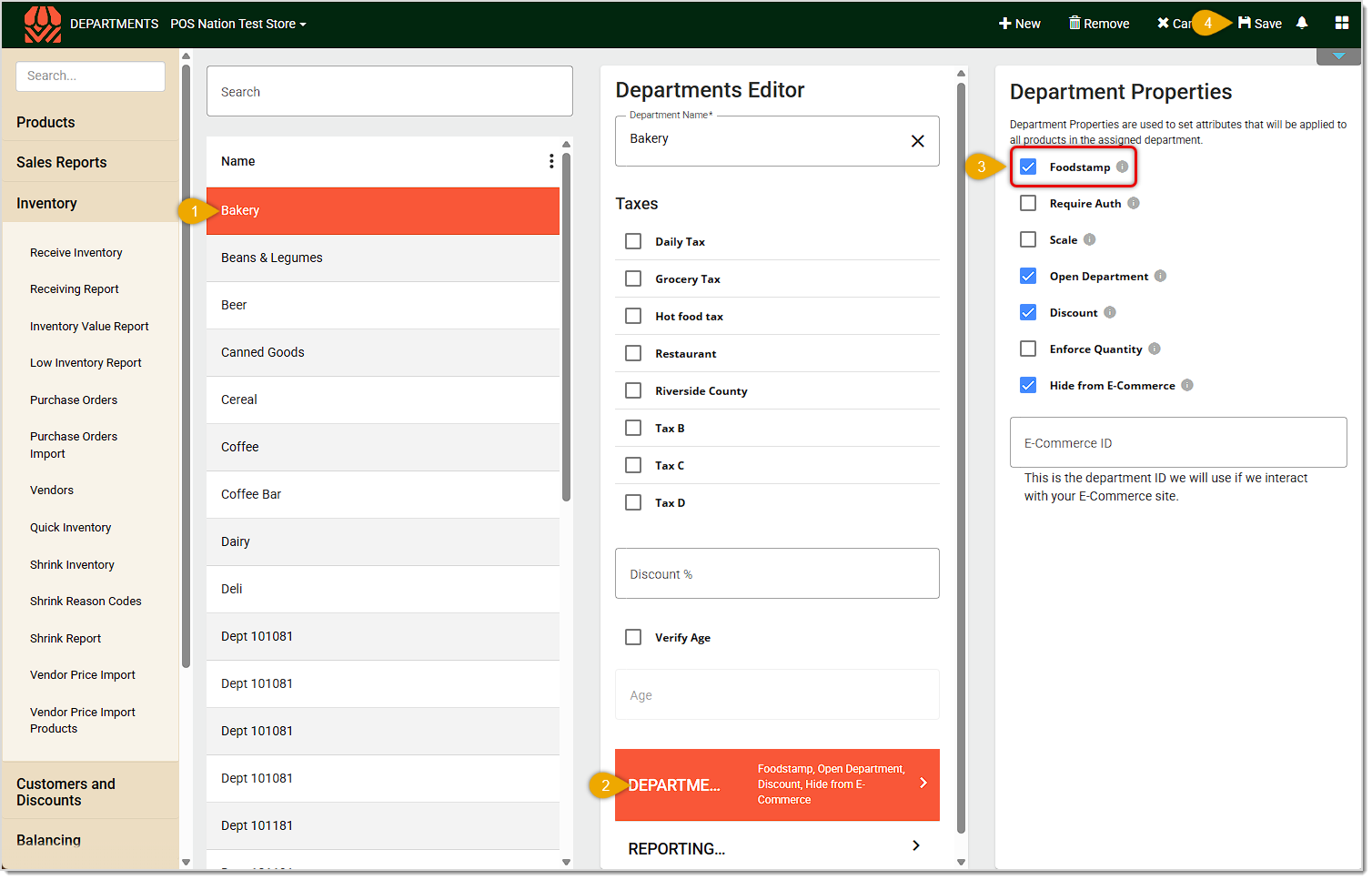
- On the Departments page, click on the Department that you want to be eligible for EBT.
- In the Departments Editor panel in the middle of the page, click on Department Properties.
- In the Department Properties panel on the right, check the Foodstamp box (if it is already selected you can unselect save and then select again and save).
- Click Save in the upper right.
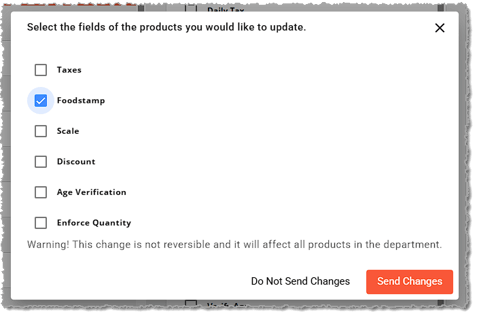
- You'll be prompted to confirm the changes you want to make. In the Send Changes window, make sure Foodstamp is selected, then click the Send Changes button to update all items in the Department.
Please Note: Any changes made from the Send Changes window are not reversible. Make sure you’ve selected the correct fields.
Repeat the above steps for all departments that will be eligible to pay via EBT / SNAP.
Using EBT for Transaction Payment
Here is how EBT works in your transactions:
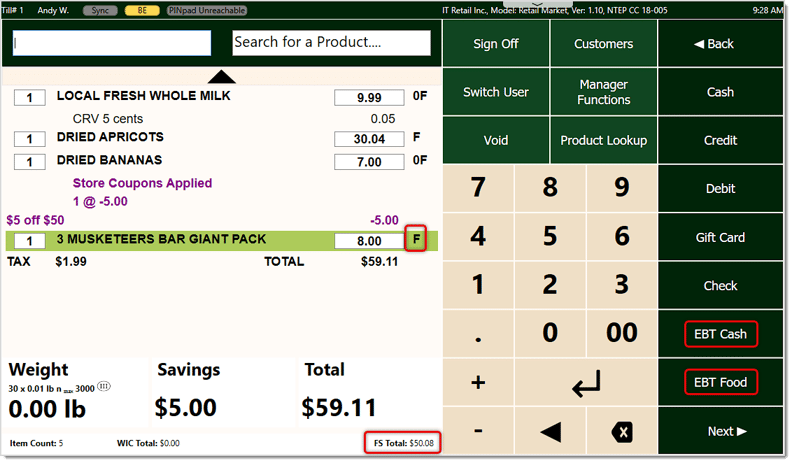
- In the Front End, as you are ringing up transactions, items that are eligible to be paid for via EBT will have an F indicator. It will be on the far right of the line item, as pictured below.
- In the Totals area at the bottom, the total amount in the order that is eligible to be paid via EBT is calculated in the FS Total area for your reference.
- Once you click the Total button in the upper right to proceed to payment, you'll see tender types for EBT Food and EBT Cash, as pictured here.
Please note the following about EBT / SNAP:
Related Topics
Cashier Training
Running EBT Transactions
POS Front End Tour
Manager Functions in the Front End
Frequently Asked Questions
Q: How do I set up payments via WIC (Women, Infants, Children)?
A: We do not currently support payments via WIC in the IT Retail system but we hope to do so in the future.
Q: I have a question, but I can't find my answer here. How do I get more assistance?
A: If you need immediate assistance, the IT Retail team is available 24/7. Feel free to contact our support team at: 877-752-0625. Or you can email us at support@marktpos.com and we will respond within 24-hours.
Welcome to IT Retail, we’re so glad you’ve chosen our POS for your store! This article will guide yo
Adding products to a customer’s transaction is straightforward. Below is a step-by-step guide on how
You can ring up a product as a Non-Scan item if it doesn’t have a UPC / PLU code or it's not yet reg








Is this page helpful?
×Help us improve our articles