SMS Report

April 23, 2026
The SMS Report lets you keep track of your SMS Campaigns. You're able to see sent messages, the number of recipients, and the number of failures. Take a look!
Review Bulk SMS Campaigns in the SMS Report
To review all Bulk SMS campaigns you have sent, in the Back End click to open the Customers & Discounts menu and go to SMS Report.
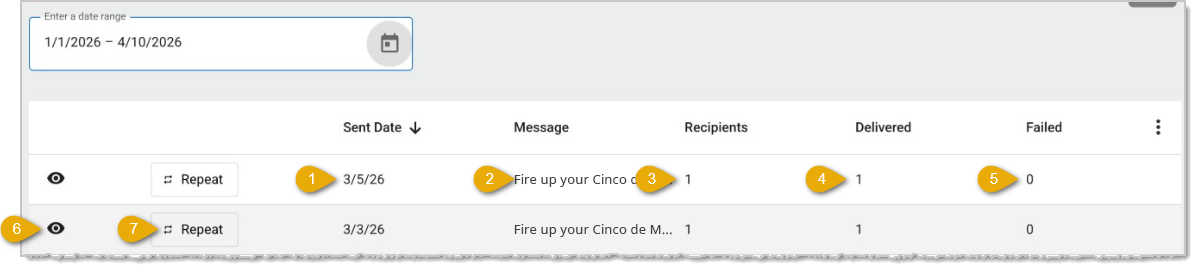
Here are the major features of the SMS Report:
- Sent Date — This column shows the date the Bulk SMS campaign was sent.
- Message — This column displays a short preview of the SMS message text.
- Recipients — This column lists the total number of customers who were sent the message.
- Delivered — This column displays the number of customers who successfully received the message.
- Failed — This column shows the number of customers who did not receive the message.
- View Campaign Details — You can click the Eye Icon (👁️🗨️) on any row to view the full details of that campaign. The details include the customers for whom the delivery of the message was successful or unsuccessful.
- Repeat Campaign — To re-send a previous campaign or use the same customer list again, click the Repeat button on any row. This will return you to the Bulk SMS page with the same customer selection pre-loaded from that campaign, allowing you to send the same or an updated message without re-filtering your customers.
Related Articles
Bulk SMS
Automatic Coupons
Coupons by Vendor or Department
Product Group Coupons
Mix & Match Coupons with Product Groups
Frequently Asked Questions
Q: I have a question, but I can't find my answer here. How do I get more assistance?
A: If you need immediate assistance, the IT Retail team is available 24/7. Feel free to contact our support team at 877-752-0625. You can also email us at support@marktpos.com, and we will respond within 24 hours.
If a customer wants to sign up for your store’s membership program, you can add them in the Front En
For businesses that charge for annual customer memberships, you can set expiration dates so you don’
You can set your customers to be able to charge items to an in-store account if you like. This artic








Is this page helpful?
×Help us improve our articles