







Cashier Training
Welcome to IT Retail, we’re so glad you’ve chosen our POS for your store! This article will guide yo
 January 08, 2026
The IT Retail system has robust tools to help you build loyalty with your customers. This article will guide you through activating and configuring your customer loyalty. Take a look at how to get started!
To set up your Customer Loyalty system, log into the IT Retail Back End and follow the steps below.
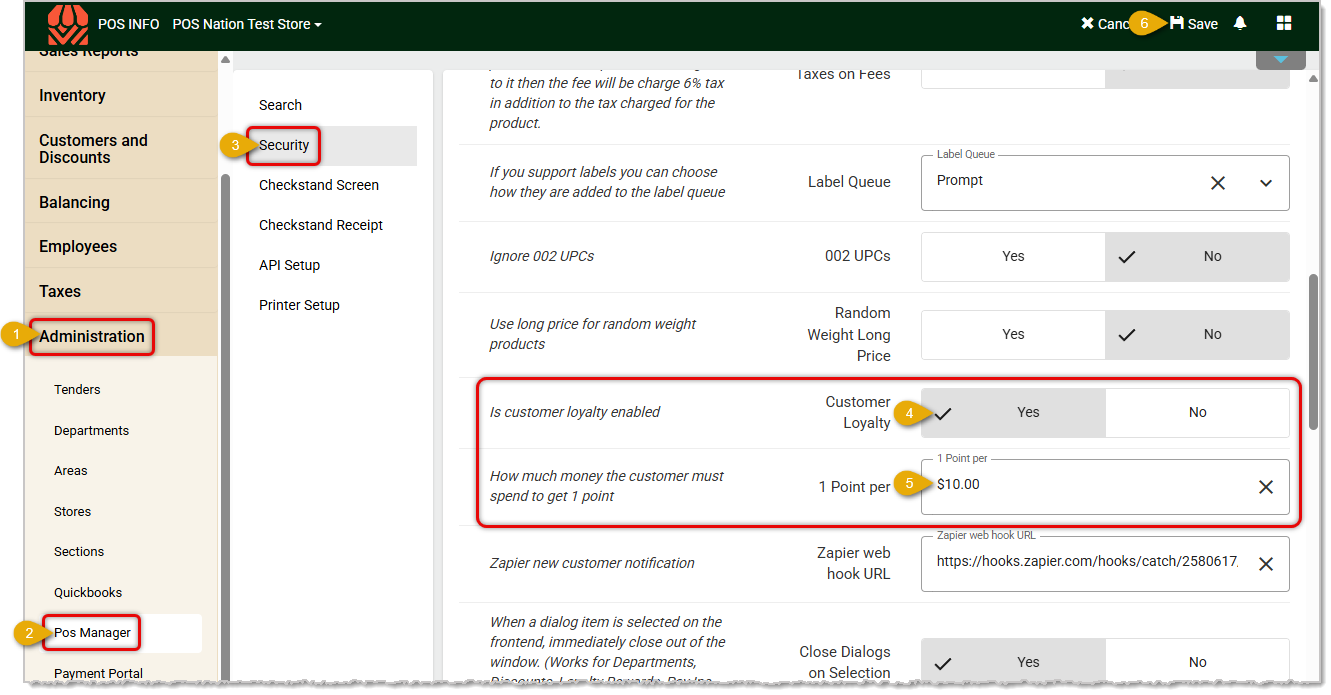
When creating your strategy for reward point configuration consider the following example:
If you set the reward to grant 1 point per ten dollars spent, as in the image above you will want them to be attainable for your customers. Using that example, you wouldn't require a customer to earn 100 points to get a $10 off coupon as a reward, as they would have to spend a thousand dollars with you. A common payout percentage for reward programs is around five percent, so if a customer earned twenty points by spending $200 and was able to redeem a $10-off reward coupon on their next purchase that would be a good value for them. But this strategy can take some customers a long time to build up points and earn such a reward.
Many retailers go with a faster and more attainable reward configuration so customers see returns more quickly. For example, if you set the amount of $5 per point in #5 above, and then created a Loyalty Reward for $5 off that needs 20 points to redeem, you're giving out rewards they'll start earning faster and giving them incentive to come back quickly.
To create a Loyalty Reward, please see the article linked below on Discounts and Loyalty Rewards for full details.
For Loyalty Rewards, customers earn points on all whole-dollar purchase amounts excluding taxes, deposits, and fees for items that generate reward points. When a customer in the reward program has earned enough reward points, they are able to redeem the points for the reward in a future transaction. Please see the article linked below for Giving Customer Reward Coupons in the Front End for full details.
Customer Membership Expirations in the Back End
Giving Customer Reward Coupons in the Front End
Q: I have a question, but I can't find my answer here. How do I get more assistance?
A: If you need immediate assistance, the IT Retail team is available 24/7. Feel free to contact our support team at 877-752-0625. You can also email us at support@marktpos.com, and we will respond within 24 hours.
Is this page helpful?
×Help us improve our articles