Customer Report

December 24, 2025
If you want to view customer activity for a certain time period, the Customers Report can show you what you need. As long as a customer was added to Front End transactions, the customer's purchases will be recorded in the report. This article shows you how to access your Customer Report, narrow down the data, and use each function in the report.
Customers Report
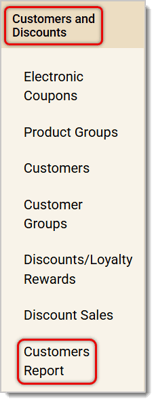
To access the Customers Report, first log into the Back End and click on Customers and Discounts to open its menu. Then click on Customers Report.
Use the below image as reference as we walk you through the Customers Report:
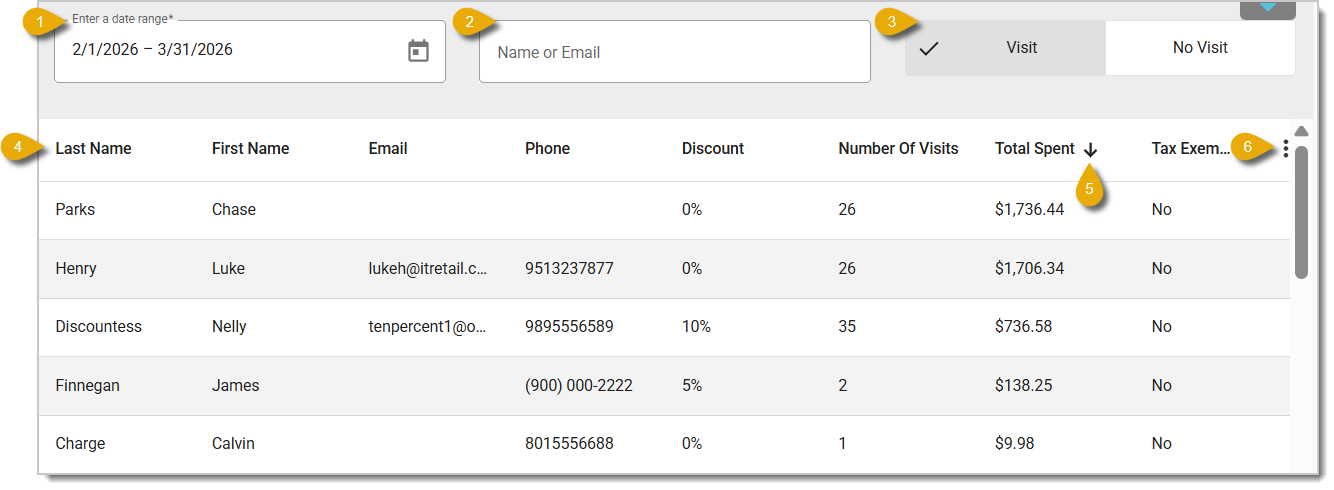
- Enter the Date Range for the data you want to view.
- Use the Search function to find a specific customer. Enter their name or email address.
- Your view by default will be for Visit. Click on No Visit if you want to view customers who haven't shopped at your store in the Date Range you selected.
- In the data table, you'll see the following columns: Last Name, First Name, Email, Phone, Discount (how much of a discount the customer gets per transaction for being a loyalty member), Number of Visits (the total number of times the customer visited your store in the selected time period), Total Spent (the total amount the customer spent at your store in the selected time period), Tax Exempt (whether or not the customer is tax exempted; this will show as either True or False), Expiration Date (when the customer's membership expires), Date of First Visit, Date of Last Visit, and the customer's total earned Loyalty Points.
- By default, your data will be sorted according to Total Spent. Click on any column header to sort your data according to that column by alphanumeric order. Click twice to reverse the sort, or click three times to clear the sort. With Total Spent, however, click once to clear the sort, or click twice to reverse the sort.
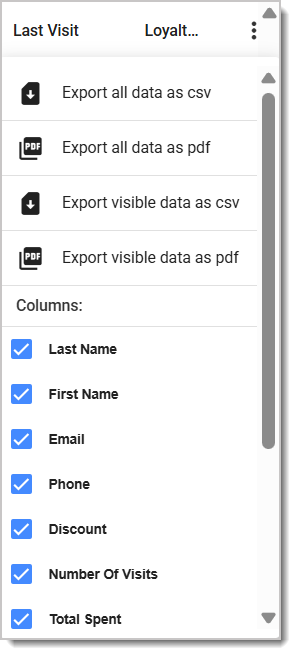
- Open the Action Menu by clicking on the Three-Dot Stack button on the right. You can choose to export your data either as a CSV or PDF file. You can also select columns (checkmarked) to show or hide.
Related Articles
Customers
Customer Groups
Discounts / Loyalty Rewards
Customer Loyalty
Customer Membership Expirations in the Front End
Customer Membership Expirations in the Back End
Frequently Asked Questions
Q: I have a question, but I can't find my answer here. How do I get more assistance?
A: If you need immediate assistance, the IT Retail team is available 24/7. Feel free to contact our support team at 877-752-0625. You can also email us at support@marktpos.com, and we will respond within 24 hours.
If a customer wants to sign up for your store’s membership program, you can add them in the Front En
For businesses that charge for annual customer memberships, you can set expiration dates so you don’
You can set your customers to be able to charge items to an in-store account if you like. This artic








Is this page helpful?
×Help us improve our articles